


Description
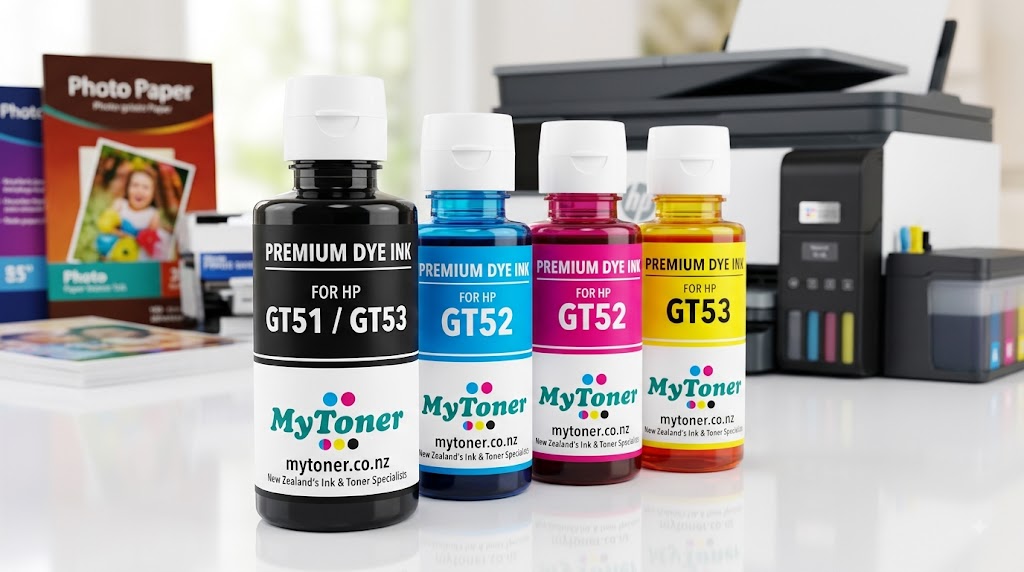
Premium GT51, GT52, & GT53 Refill Dye Ink Bottle Set for HP Smart Tank Printers
Maximize your printing efficiency and achieve vibrant, laboratory-quality output with our Premium GT51, GT52, and GT53 Refill Dye Ink Set. Specifically formulated for HP Smart Tank and DeskJet GT series printers, this high-yield ink refill kit provides exceptional color accuracy, rich text clarity, and reliable performance at a fraction of the cost of OEM bottles.
Whether you are printing high-volume office reports, crisp business documents, colorful charts, or glossy family photographs, this refill ink set ensures consistent, clog-free printing from the first page to the last.
Package Contents
This complete 4-color ink bottle multipack includes everything you need to replenish your HP continuous ink supply system (CISS):
-
1x GT51 / GT53 Black Ink Bottle (High-Density Dye/Pigment Formula) – Formulated for deep, razor-sharp text, dark lines, and precise barcodes.
-
1x GT52 Cyan Ink Bottle – Delivers brilliant blues, true sky tones, and rich balance across photographic prints.
-
1x GT52 Magenta Ink Bottle – Formulated for striking reds, vibrant pinks, and warm natural tones.
-
1x GT52 Yellow Ink Bottle – Produces bright, vivid highlights and warm, sunlit colors across graphics and photos.
Key Features & Advantages
1. Exceptional Print Quality & Color Fidelity
Engineered using high-purity micro-filtered dye chemistry, our GT51/GT52/GT53 ink produces brilliant, fade-resistant color gradients and razor-sharp black text. The formulation is fine-tuned to match the color temperature and drying speed of original HP inks, ensuring flawless results across plain paper, brochure media, and glossy photo paper.
2. Massively Reduced Cost Per Page
Continuous ink tank printers are designed for high-volume efficiency. Our compatible GT refill bottles drastically reduce your running costs, making high-volume printing effortless and economical. Print thousands of pages of full-color brochures, school projects, or business correspondence without worrying about running out of ink.
3. Spill-Free & No-Mess Refill Design
Each bottle features an auto-stop, spill-proof nozzle assembly custom-molded to fit HP Smart Tank ink ports. Simply align the bottle spout with the designated tank valve and press down. Ink flows smoothly without squeeze requirement and automatically stops when the tank reaches full capacity, keeping your workspace completely clean.
4. Anti-Clogging & Quick-Drying Chemistry
Our advanced fluid formula prevents sediment buildup inside micro-fine thermal printhead nozzles. The quick-drying properties reduce smudging when handling freshly printed sheets, enabling immediate double-sided printing and clean highlighting.
5. Eco-Friendly & Sustainable Choice
Refilling your existing ink tanks eliminates the need for single-use plastic cartridges. Our high-capacity refill bottles help minimize plastic waste, offering an environmentally responsible printing choice without compromising on output quality.
Technical Specifications
-
Product Type: Compatible Refill Dye Ink Bottles
-
Equivalent Part Numbers: GT51 (Black), GT52 (Cyan, Magenta, Yellow), GT53 (Black)
-
Bottle Capacities: 90ml / 135ml Black, 70ml per Color (Cyan, Magenta, Yellow)
-
Page Yield: Up to 6,000 pages (Black) and 8,000 pages (Color combined at 5% standard page coverage)
-
Ink Type: High-Purity Dye Ink Formula
-
Shelf Life: 24 Months (stored sealed at room temperature away from direct sunlight)
Universal Compatibility
This GT51, GT52, and GT53 refill kit is compatible with a wide array of HP Smart Tank, Ink Tank, and DeskJet GT series printers:
-
HP Smart Tank Series: 500, 515, 516, 519, 530, 532, 615, 618, 670, 720, 750, 790
-
HP Smart Tank Plus Series: 551, 555, 559, 570, 571, 651, 655
-
HP Ink Tank Series: 310, 315, 319, 410, 415, 419
-
HP DeskJet GT Series: GT 5810, GT 5820
Quick & Easy Refill Instructions
-
Prepare the Printer: Power on your printer and open the outer cover to access the ink tank compartment.
-
Open Tank Cap: Remove the rubber plug or flip open the cap for the specific color tank you wish to refill.
-
Unseal the Ink Bottle: Uncap the new ink bottle. Do not squeeze the bottle during handling.
-
Dock and Fill: Invert the bottle and seat the nozzle straight into the printer’s tank valve. The ink will automatically fill the reservoir and stop when full.
-
Reseal: Remove the bottle, securely close the printer tank cap, and close the outer cover. Your printer is immediately ready for operation.

Reviews
There are no reviews yet.