


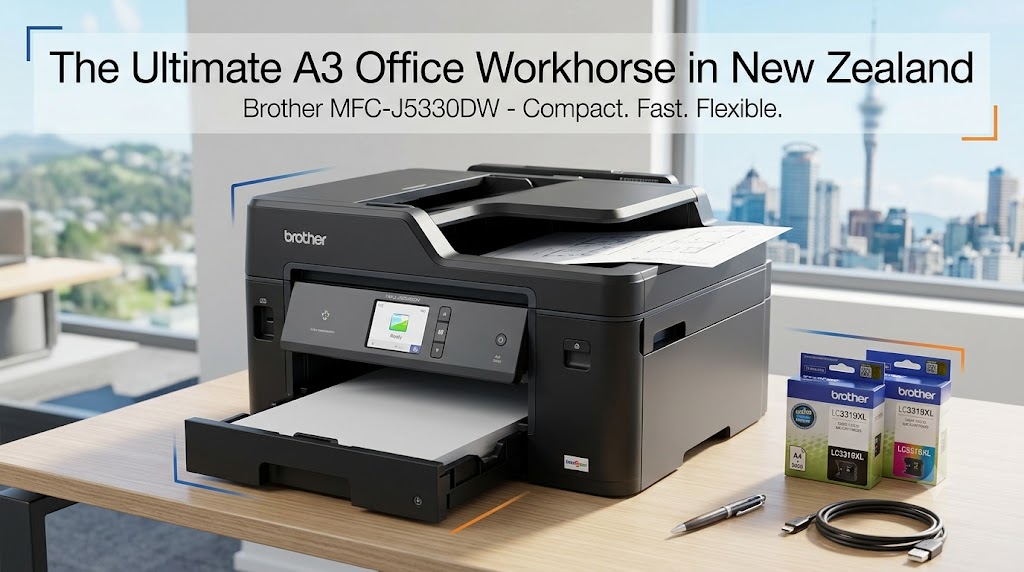
In New Zealand’s fast-moving business landscape—from bustling Auckland agencies and Christchurch trade firms to home offices in Wellington and regional hubs—efficiency and cost management are top priorities. Having a multi-function printer that handles tight deadlines without inflated operating costs is critical.
For years, Kiwi businesses faced a frustrating choice when choosing office hardware: purchase a standard A4 desktop printer and forfeit the ability to print larger diagrams and posters, or invest in an expensive, bulky commercial A3 copier that takes up half the office floor.
The Brother MFC-J5330DW All-In-One Inkjet Printer bridges that gap. Engineered as part of Brother’s business-class inkjet lineup, it packs full A4 multi-function capabilities—printing, scanning, copying, and faxing—alongside full A3 print functionality, all within an A4-sized desktop footprint.
Whether you are a tradie needing site plan printouts, an accountant managing multi-page financial statements, or a creative agency drafting marketing proofs, this in-depth guide covers everything you need to know about the Brother MFC-J5330DW in New Zealand.
Technical Specifications Overview
To help you evaluate whether the MFC-J5330DW aligns with your technical requirements, here is a breakdown of its core hardware specifications:
| Feature Category | Specification Details |
| Functions | Print, Copy, Scan, Fax (A4 Multi-Function / Up to A3 Print) |
| Print Speed | Up to 22 ipm (Mono) / 20 ipm (Colour) |
| First Page Out Time | Approx. 6.0 seconds from ready mode |
| Print Resolution | Up to 1200 x 4800 dpi |
| Double-Sided Printing | Automatic 2-sided (Duplex) printing up to A4 size |
| Paper Capacity | 250-sheet standard tray + 1-sheet rear manual feed slot |
| Document Feeder | 50-sheet Automatic Document Feeder (ADF) |
| Display | 6.8cm (2.7-inch) Colour Touchscreen LCD |
| Connectivity | Wi-Fi (802.11b/g/n), Ethernet, USB 2.0, Wi-Fi Direct |
| Mobile Printing | Apple AirPrint, Mopria, Brother iPrint&Scan app |
| Standard Ink Yield | LC3317 Series: ~550 pages per cartridge |
| High-Yield Ink Yield | LC3319XL Series: Black (~3,000 pages), CMY (~1,500 pages) |
5 Standout Features That Make the MFC-J5330DW a Top NZ Choice
1. A3 Capability in an A4 Desk Footprint
Space is often at a premium in modern Kiwi workplaces and home offices. The standout engineering feature of the MFC-J5330DW is its landscape paper feeding mechanism. By feeding paper horizontally rather than vertically, Brother engineered a printer that takes up minimal desk real estate while retaining full support for large-format paper sizes.
When you need to output an A3 architectural plan, gantt chart, or marketing poster, you simply feed the media through the rear manual feed slot or expand the main paper tray. This eliminates the need to outsource occasional large-format jobs to local print shops, saving both time and money.
2. High-Speed Output Built for High Workloads
In a busy office environment, waiting around for a printer slows down productivity. The MFC-J5330DW delivers a First Page Out Time (FPOT) of roughly 6 seconds, meaning short single-page prints complete almost instantly.
For longer documents, continuous ISO print speeds reach up to 22 images per minute (ipm) in monochrome and 20 ipm in colour. Combined with automatic two-sided (duplex) printing, your team can easily handle multi-page contracts and reports without manual paper flipping.
3. Low Running Costs with LC3319XL Super High-Yield Inks
Running costs are a major factor when choosing an office printer in NZ. Standard ink cartridges often lead to frequent replacements and inflated page costs, but the MFC-J5330DW supports Brother LC3319XL Super High-Yield Ink Cartridges:
- LC3319XL Black Ink Cartridge: Delivers up to 3,000 pages.
- LC3319XL Cyan / Magenta / Yellow Cartridges: Deliver up to 1,500 pages each.
Using high-yield consumables keeps your cost-per-page extremely competitive compared to traditional laser printers in the same price class. Furthermore, Brother’s four-cartridge system means you only replace the specific colour that has run out, minimizing ink waste.
Cost Efficiency Comparison:
Standard Cartridge (LC3317)  --> ~550 pages yield   (Higher cost per page)
High-Yield Cartridge (LC3319XL) --> Up to 3,000 pages (Lower long-term running cost)
4. Robust Wireless, Mobile, and Cloud Connectivity
With flexible and remote work standard across New Zealand, smooth device connectivity is essential. The MFC-J5330DW offers versatile connection protocols to fit any network setup:
- Direct Mobile Printing: Print instantly from iPhones, iPads, and Android smartphones using Apple AirPrint, Mopria, or the free Brother iPrint&Scan application.
- Wi-Fi Direct: Connect mobile devices directly to the printer without going through your main office router.
- Cloud Integration: Use the 6.8cm LCD touchscreen to scan documents directly to cloud services like Google Drive, Dropbox, OneDrive, and Evernote, or print files directly from cloud storage.
Pro Tip: By leveraging Brother Cloud Apps, you can convert scanned paper documents directly into editable Microsoft Office formats (Word, Excel, PowerPoint) or searchable PDFs.
5. Efficient Paper Handling & 50-Sheet ADF
Handling batch jobs is straightforward thanks to a primary 250-sheet paper tray that supports media weights up to 220 gsm. The top-mounted 50-sheet Automatic Document Feeder (ADF) streamlines multi-page copying, scanning, and faxing. Instead of placing pages individually on the flatbed glass, stack your document into the ADF and let the machine process the batch automatically.
Real-World NZ Use Cases: Who Benefits Most?
1. Construction, Building Tradies & Architects
Kiwi builders, electricians, plumbers, and architects frequently deal with A3 floor plans, site diagrams, and consent documents. Having local A3 printing inside your office or site ute office saves time and prevents unnecessary trips to commercial copy centers.
2. Accounting, Legal & Professional Services
Financial firms print large volumes of dual-sided spreadsheets, client tax returns, and legal contracts. The high mono speed (22 ipm), 250-sheet tray capacity, and high-yield black ink make the MFC-J5330DW an efficient workhorse for daily paper workflows.
3. E-Commerce & Retail Businesses
For online store operators in NZ printing packing slips, shipping labels, marketing inserts, and product sheets daily, fast print speeds and reliable Wi-Fi connections keep fulfillment lines running smoothly.
Pros & Cons Breakdown
To provide an unbiased assessment, here is a summary of the strengths and limitations of the Brother MFC-J5330DW:
Pros
- Versatile Paper Support: Prints full A3 documents while keeping a small desk footprint.
- Economical Ink Options: Supports LC3319XL super high-yield cartridges for low per-page costs.
- Fast First Page Out: Prints the first page in as fast as 6 seconds.
- Comprehensive Connectivity: Full support for Wi-Fi, Ethernet, USB, AirPrint, and cloud integration.
- Durable Build Quality: Engineered to handle high-volume business printing cycles.
Cons
- Single-Sided Scanning: While printing supports auto-duplexing, the ADF scanner processes single-sided pages.
- A4-Only Flatbed Scanner: Scanning and copying on the glass top are limited to A4; A3 functionality applies strictly to printing.
Sourcing Ink & Local Support in New Zealand
Maintaining your Brother MFC-J5330DW in New Zealand is straightforward due to widespread local availability for consumables and warranty support.
- Genuine Inks: Authentic Brother LC3317 (Standard Yield) and Brother LC3319XL (Super High Yield) cartridges are available across major NZ tech retailers, office supply vendors, and specialized cartridge distributors.
- 7-Day NZ Support: Brother New Zealand offers locally based customer service and technical support hotline options, ensuring setup assistance or troubleshooting is always accessible.
Frequently Asked Questions (FAQ)
Q: Does the Brother MFC-J5330DW support A3 scanning and copying?
A: No. The flatbed glass scanner and the 50-sheet ADF support paper sizes up to A4. The machine’s A3 capabilities are specifically designed for printing via the rear manual feed slot and extended main paper tray.
Q: Which ink cartridges should I purchase for the lowest running costs in NZ?
A: For the best cost efficiency, choose the Brother LC3319XL Super High-Yield Cartridges. The LC3319XL Black yields approximately 3,000 pages, while the LC3319XL Colour cartridges (Cyan, Magenta, Yellow) yield approximately 1,500 pages each.
Q: Can I print directly from my mobile device without an existing Wi-Fi router?
A: Yes. The printer supports Wi-Fi Direct. You can connect your smartphone, tablet, or laptop directly to the printer’s wireless signal without routing through a local office network.
Q: Does this printer support automatic double-sided printing for A3 paper?
A: Automatic double-sided (duplex) printing is supported for A4 size paper. A3 pages are printed single-sided through the manual feed or tray expansion.