


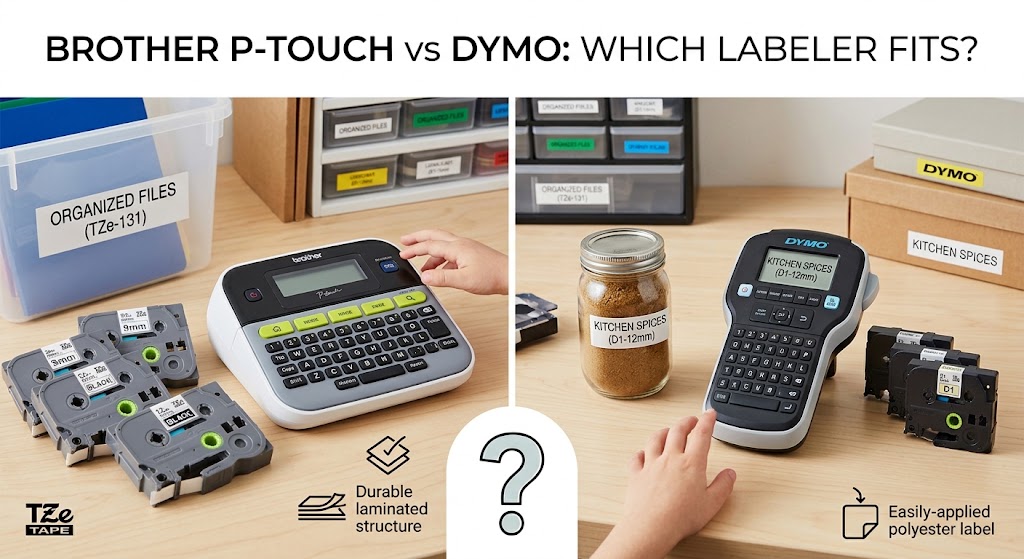
Brother P-Touch vs DYMO: Which Labeler Fits? A label maker earns its place when it saves time every week – on storage bins, files, cables, shipping shelves, school supplies, or equipment. In the Brother P-Touch vs DYMO decision, the better choice is rarely about which brand has the most features. It comes down to the labels you need to create, where they will be used, and how easy it is to keep the right supplies on hand.
Both brands make dependable label printers for homes, offices, and busy small businesses. The key is choosing a machine and tape system that match your everyday work, rather than paying for functions you will not use.
Brother P-Touch vs DYMO: The Main Difference
Brother P-Touch label makers are best known for durable laminated tape labels. Many P-Touch models use TZe tape cassettes, which are designed for clear, long-lasting labels on folders, containers, cables, tools, and general workplace organization. Brother P-Touch vs DYMO: Which Labeler Fits They are a practical choice when labels may face handling, moisture, friction, or changing temperatures.
DYMO has a wider split between tape label makers and dedicated shipping or address label printers. DYMO LabelManager units commonly use D1 tape, while DYMO Rhino models are built for tougher job-site and industrial labeling. The brand is also well known for LabelWriter printers, which use rolls of direct thermal paper labels for addresses, barcodes, filing, and shipping.
That distinction matters. If you want tape labels for drawers, pantry jars, folders, and cables, compare P-Touch and DYMO tape machines. If your main job is printing many postage, product, or warehouse labels from a computer, a DYMO LabelWriter-style printer may be the more suitable category altogether.
Choose Brother P-Touch for Everyday Durable Labels
A Brother P-Touch is often the straightforward choice for home offices, classrooms, retail counters, and small businesses that need labels to stay readable over time. Laminated TZe labels are especially useful for shared spaces where labels get touched, wiped, moved, or exposed to occasional moisture.
P-Touch machines range from simple handheld models to desktop and computer-connected options. A basic unit is enough for occasional labeling, while a more advanced model can be worthwhile if you need multiple lines, symbols, barcodes, cable-wrap formats, or labels designed from a computer or mobile device.
Brother tape is available in several widths, colors, and finishes. That flexibility helps when one label maker needs to handle different jobs. For example, narrow tape works well for file tabs and cables, while wider tape is easier to read on storage bins, shelves, and equipment.
The trade-off is that laminated tape can cost more per label than paper labels from a thermal label printer. For low- to medium-volume labeling, however, its durability often provides better value because you are less likely to replace faded or damaged labels.
Choose DYMO for Specialized Labeling Work
DYMO is a strong option when your labeling needs are more specific. A compact LabelManager can handle routine office and home organization, while a Rhino model is better suited to maintenance teams, electricians, network installers, and workshops that need labels for wires, panels, and equipment.
For shipping and mailing, DYMO LabelWriter printers are designed for speed and convenience. They print individual paper labels without ink or toner, which can simplify dispatch work for online sellers, offices, and stockrooms. If you regularly send parcels or label products, the ability to print addresses and barcodes directly from a computer can save a meaningful amount of time.
However, paper shipping labels are not a replacement for laminated tape. They are ideal for cartons, envelopes, and temporary warehouse identification, but they may not be right for outdoor tools, frequently cleaned containers, or cables that need a wrapped label. Match the label material to the job before choosing the printer.
Compare Supplies Before You Buy the Machine
The label maker itself is only the starting cost. Tapes and labels are the supplies you will buy repeatedly, so compatibility should be part of your decision from the beginning.
Brother P-Touch machines commonly use TZe tape, but not every P-Touch model accepts every cassette width. Check your exact model before ordering. Some models also support specialized options such as flexible ID tape, strong-adhesive tape, fabric tape, or heat-shrink tubing.
DYMO supplies vary more by product line. LabelManager machines generally use D1 tapes, Rhino machines use Rhino industrial labels, and LabelWriter printers use dedicated paper label rolls. These supplies are not interchangeable with Brother P-Touch tapes or with each other.
For budget-conscious buyers, compatible label tapes can be a smart way to control ongoing costs. The important point is to buy compatible supplies made for your specific printer series and tape width. A cassette that looks similar may not fit correctly, and forcing the wrong tape into a label maker can lead to jams, poor print quality, or wasted labels.
Printing Quality, Speed, and Ease of Use
For short labels made one at a time, both Brother P-Touch and DYMO handheld units are easy to use. You type the text, choose the size or style, then print. Brother often appeals to buyers who want a familiar, practical setup for a broad range of household and office labels. DYMO can be especially attractive for users who need an industrial format or high-volume computer-based labels.
The fastest option depends on the workflow. A handheld label maker is convenient when you are standing in a storage room, labeling files at a desk, or organizing supplies as you go. A computer-connected label printer is more efficient when you need dozens or hundreds of labels with the same layout, sequential numbers, addresses, or barcodes.
Do not focus only on advertised print speed. Loading tape, trimming labels, creating templates, and replacing supplies all affect the real time spent on a job. For occasional use, a simple machine that takes the right affordable tape can be better than a more complex unit with features that sit unused.
A Practical Buying Checklist
Before selecting a Brother P-Touch or DYMO label maker, answer four questions:
- What are you labeling most often: files and containers, cables and equipment, or parcels and products?
- Does the label need to survive moisture, heat, handling, or cleaning?
- Will you print one label at a time, or batches from a computer?
- Which tapes or label rolls are readily available for the exact model you plan to use?
If your answers point to durable, general-purpose tape labels, a Brother P-Touch with the right TZe tape is usually a dependable fit. If you need industrial cable identification, DYMO Rhino may make more sense. If your priority is shipping labels and high-volume address labels, look at DYMO’s direct thermal LabelWriter range instead of a tape labeler.
Avoid These Common Label Maker Mistakes
The most common mistake is buying based on the lowest printer price and checking consumables later. A low-cost machine is not a bargain if its tapes are difficult to find or unsuitable for your labels. Confirm the supply type, widths, and expected replacement cost before committing.
Another mistake is choosing a paper-label printer for labels that need to last on tools, storage tubs, or wiring. Direct thermal labels are efficient, but they are purpose-built for different conditions than laminated tape. Similarly, do not buy a rugged industrial machine if a basic handheld labeler will only be used a few times a year.
Finally, keep a spare tape cassette or label roll for the jobs that cannot wait. Inktoner Cartridge supplies compatible labeling products for customers who want dependable replacements without paying more than necessary, making it easier to replenish the tape your label maker actually uses.
The best labeler is the one that makes your next organizing, filing, or shipping task quicker – and whose supplies are easy to order before the current cassette runs out.